
- 4.1
- 3,163 ratings
- 99.07 MB
- Size
- Android 8.0+
- Android
About this app
Table of contents
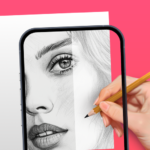
By leveraging augmented reality technology, AR Drawing: Sketch & Paint provides a workspace for users to learn drawing and create artwork by projecting images directly onto a physical surface. The app functions by using your phone camera to superimpose a chosen template or image onto the paper below, allowing you to trace the lines accurately. Whether you are creating a sketch from scratch or tracing an existing guide, the tool helps bridge the gap between digital reference images and traditional paper-and-pencil art.
Tracing and Template Library
The core workflow revolves around a collection of built-in templates covering diverse subjects such as animals, cars, nature, food, and anime. You can select one of these templates to project onto your drawing surface, which assists in mapping out shapes and proportions before you begin adding detail or color. This method is designed to help users practice their hand-eye coordination while following a visual guide, effectively acting as a digital assistant for traditional artistic techniques.
Drawing and Recording Tools
To ensure your drawing area is visible regardless of ambient lighting, the app includes a built-in flashlight that illuminates your workspace during the tracing process. Beyond just sketching and painting, the software offers the ability to record a video of your creative process. This allows you to capture the development of your work from start to finish, which you can then save to your gallery or share with others to display the progress of your final piece.
Practical Workflow and Limitations
The app is intended to facilitate the translation of digital visuals onto physical media like paper. Because the system relies on the device camera to project the image onto the drawing surface, the effectiveness of the trace depends on your ability to stabilize the phone while following the projected lines. Once you have finished your sketch and applied your colors, you can save the final result directly within the app, keeping a digital record of your physical projects alongside your recorded process videos.
File information
- App name
- AR Drawing: Sketch & Paint
- Publisher
- AR Drawing
- Category
- Art & Design
- Version
- 5.2.8
- Size
- 99.07 MB
- Format
- XAPK
- Requires Android
- Android 8.0+
- Package name
- ar.drawing.sketch.paint.trace.draw.picture.paper
Security scan completed
Installation
- Tap Download and wait for the file to finish downloading.
- Open the file from your Downloads folder.
- Use an installer that supports this file format.



Ratings and comments
0 comments